
Guide
US Targeting on TikTok: How to Set Up an Account From Anywhere

TikTok shows a new account's videos to people near the phone. If the phone is in Thailand, the viewers are in Thailand. This guide is the setup that makes a phone read as American, so a new account reaches US viewers from wherever you sit, and the check at the end that proves it.
Contents
- Why target the US
- How TikTok decides where your videos go
- What you need
- Step 1: Wipe the phone
- Step 2: Set the language and region
- Step 3: Make a fresh Gmail and Apple ID
- Step 4: Move the App Store to the US
- Step 5: Put the phone behind a US IP
- Step 6: Install TikTok and create the account
- Step 7: Warm the account up
- Step 8: Check where your viewers are
- Rules that never switch off
- If the account gets shadowbanned
- How many accounts per phone
- FAQ
- Recap
Why target the US
Views are worth different amounts in different countries. A viewer in the US, the UK, Canada or Australia pays for apps at a rate most other markets never approach, so a US audience turns the same content into far more revenue. If your app is priced in dollars and you sit outside the US, the views you get by default are mostly worthless.
Change US to any other country below and the process is the same. Every step is about making one signal, the country, agree across the whole phone.
How TikTok decides where your videos go
A new account gets distributed by the phone's location. Sit in France and the first viewers are French. Fly to Morocco with the same new account and the next videos go to Morocco.
Over time, posting in one language shifts distribution toward the countries that speak it. Post from Portugal in Portuguese and Brazil takes over, because the audience there is bigger. A post that takes off spreads past the target country too: a US phone can go viral and pull heavy traffic from the UK and Europe.
TikTok reads the country from more than the IP address. The phone's region, language, keyboard, time zone, App Store country, Apple ID country and SIM all count, and they have to agree. A US IP on a phone whose App Store says Vietnam is an inconsistency, and inconsistencies are what get an account restricted.
What you need
- An iPhone you can wipe. It does not need to be new. It needs to be clean, which the first step handles.
- No SIM card. A local SIM contradicts every other signal. Wi-Fi only is the simple, safe version.
- A paid VPN or proxy with US servers. Free ones are out; see Step 5 for what to look for.
- A fresh Gmail address, made in Step 3.
- Patience. A phone set up in an hour and posting the same day is the fastest way to a flag.
Step 1: Wipe the phone
A factory reset clears every previous account, cached location, cookie, Apple ID trace and network setting. TikTok reads device-level signals, so a phone that still carries its last owner's history can tie your new account to an old one, including one that was banned.
- Open Settings, then General, then Transfer or Reset iPhone.
- Tap Erase All Content and Settings and confirm with the passcode.
- If the phone is signed into an Apple ID, enter its password to turn off Find My and clear the Activation Lock. Make sure you have those credentials before you begin.
- Wait. The erase takes 5 to 15 minutes, and the phone reboots to the Hello screen.
Step 2: Set the language and region
The first two choices on the Hello screen are language and country. They set the keyboard, date format, currency and autocorrect, all of which feed the device fingerprint, and the country picks which App Store the phone connects to.
- Swipe up on Hello and choose English.
- Choose United States as the region. The list is long and easy to misclick: United States Minor Outlying Islands sits right below it.
- When the phone asks for a time zone, or once you reach Settings, set it to a US zone and switch off automatic time zone, so the clock never gives the phone's real location away.
Skip signing into an Apple ID during setup. You make a new one in the next step.
Step 3: Make a fresh Gmail and Apple ID
An old Apple ID carries linked devices, purchases, location history and phone numbers. Signing in with one undoes the reset. Every phone gets its own new Apple ID, and every Apple ID gets its own new Gmail.
The Gmail first. Open Safari on the phone, go to mail.google.com and create a new account. Use Gmail: other providers get TikTok accounts flagged far more often. Use a fresh name, and nothing that points back at your other addresses. If your main email is yourname@gmail.com, yourname.farm01 is a link, and links are what you are cutting.
Then the Apple ID. Open Settings, tap Sign in to your iPhone, then Don't have an Apple ID or forgot it? and Create Apple ID. Use the new Gmail as the address, set the country to United States, and pick a name and date of birth that match the region you chose in Step 2. Apple emails a code to the Gmail to finish.
Never share one Apple ID across several phones.
Step 4: Move the App Store to the US
The App Store country is a separate setting tied to the Apple ID, and it decides which build of TikTok you get. If the region in Step 2 already said United States and the new Apple ID was created as a US account, check that it stuck. If either is elsewhere, change it here.
- Open Settings, tap your name, then Media & Purchases, then View Account.
- Tap Country/Region, then Change Country or Region, and choose United States.
- Agree to the terms, then fill in a payment method, billing address and phone number.
You are not in the US, so the address and number have to be plausible ones. Ask an assistant for a realistic US address, or use an address generator, and check the zip code, city and state agree, because Apple validates that they do. The phone number needs a US country code and a real area code; Apple does not call it. For payment, choose None where it is offered. If Apple insists, a US gift card or virtual card unlocks it.
Step 5: Put the phone behind a US IP
Everything above only works if the IP address backs it up. This is the step most people get wrong, and the wrong choice here undoes the rest.
Pay for it. Free VPNs share one IP among thousands of people, plenty of them running spam or automation. Those addresses are already on TikTok's lists.
Prefer a dedicated IP. On a shared address, one bad actor gets the whole address restricted, and every account behind it with it. A dedicated or static IP is yours alone. For one phone with one or two accounts in a low-risk country, a reputable paid VPN on a normal server is usually enough. For several phones, or from a country TikTok watches closely (Russia, India), pay for a dedicated IP and treat it as a running cost.
Avoid the cheap and the unknown. A provider that seems too cheap is recycling and overcrowding its pool, which is the thing you are paying to escape.
No provider is named here because the market turns over too fast for a recommendation to stay true. Test before you commit.
What a bad IP costs you, in rising order:
- Shadowban. Reach drops to nothing and TikTok tells you nothing. The most common outcome of a dirty IP.
- Account ban. Outright, when the IP is already tied to spam.
- Device ban. TikTok flags the phone itself. A new VPN, a new account and another reset make no difference. Rare, and the phone is finished for TikTok when it happens.
Step 6: Install TikTok and create the account
With the VPN on, open the App Store and install TikTok. Then check three things before you sign up:
- On the sign-up screen, the phone number field should offer the +1 prefix. If it shows your own country's prefix, something upstream is wrong. Stop and fix it before going further.
- Sign up with the fresh Gmail from Step 3, with a date of birth that makes the account 18 or older. Do not sign up with a phone number.
- If TikTok asks for content languages, pick English. If you are targeting a non-English country, pick its language and English both, so you can still read your own feed.
Once you are in, scroll the For You page. It should look American: American places, American brands, American accents. If it looks like home, the setup leaked somewhere.
Every further account on the same phone needs its own new Gmail. Never reuse one.
Step 7: Warm the account up
TikTok watches what a new account does. An account that signs up and posts within the hour, without watching anything, behaves like a bot. Nobody has proven warming up is required, and nobody has proven it is not, so lower the odds: the cost is a couple of days.
- Day one, no posting. Scroll the For You page for 15 to 30 minutes and watch videos to the end rather than flicking past them.
- Stay inside your niche. Like, bookmark and comment on a handful of posts, and follow 30 to 50 accounts in your niche, slowly. If a creator or contractor runs the account for you, ask them to collect those profiles first.
- Look like a person. Add a profile picture and write the bio in the first days, while you are still only browsing.
- Post after two or three sessions of this, spread over one to three days. Some people wait a week; three real sessions is usually enough. Time is money.
Keep browsing between posts once you start. Scroll the For You page for two or three minutes before and after each upload. It tells the algorithm a person sits behind the account.
Step 8: Check where your viewers are
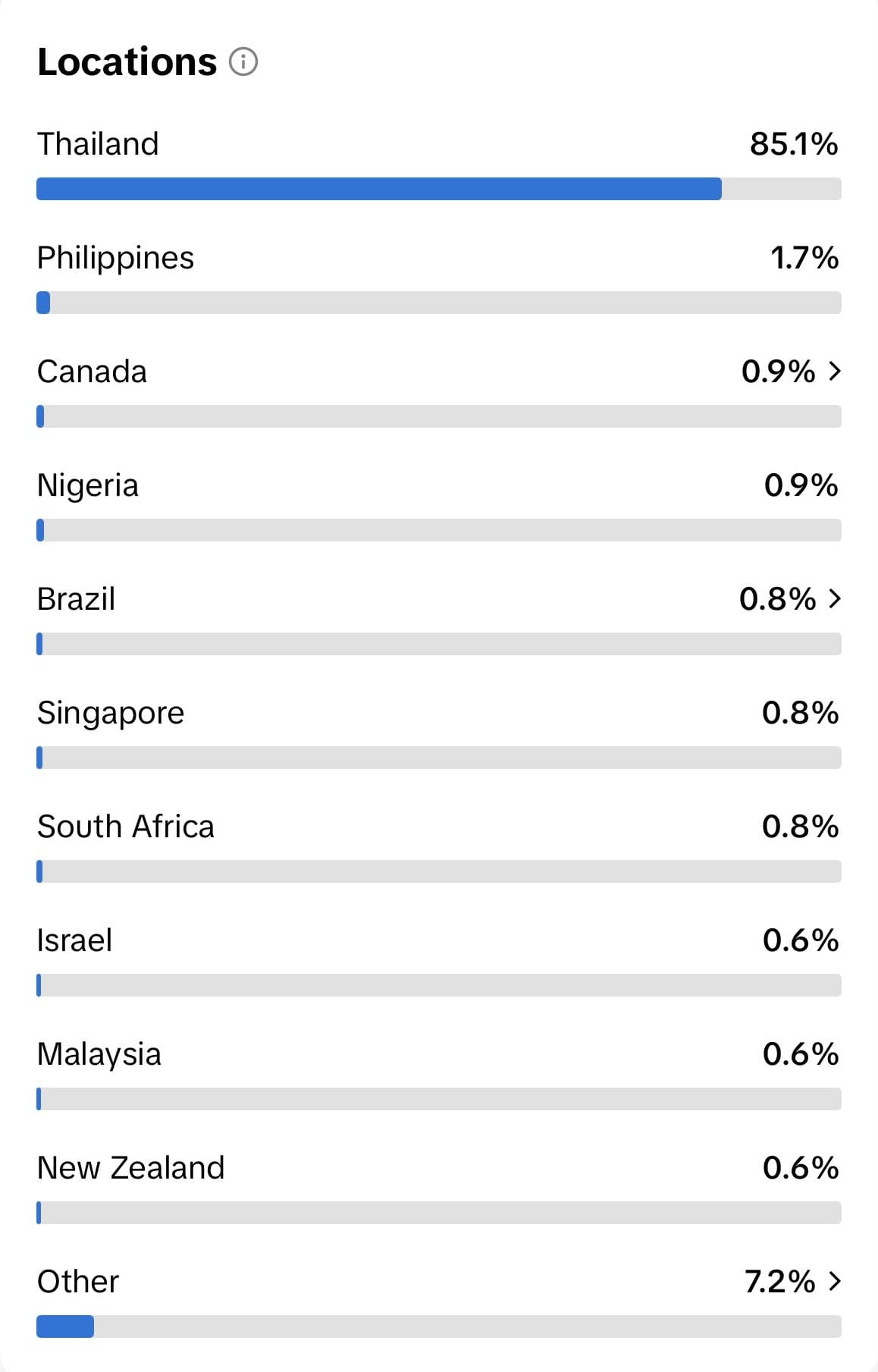
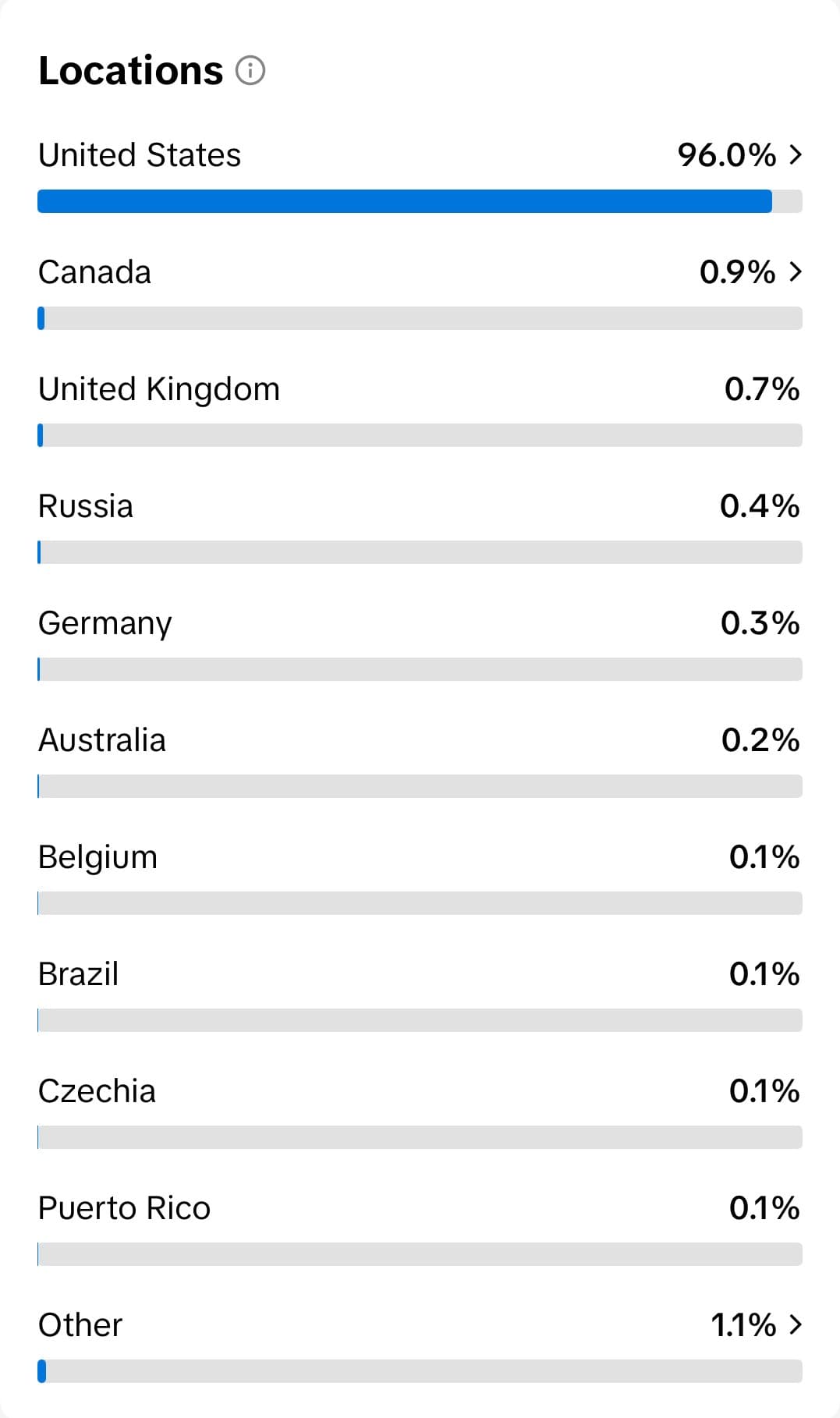
This is the check the two screenshots at the top came from. Once a few videos are up:
- Open your profile and tap TikTok Studio. If you do not see it, switch the account to creator mode in settings, which is what turns TikTok Studio on.
- Open a video's analytics and tap the Viewers tab.
- Scroll to Locations.
A working setup shows the United States at the top with most of the bar. The left screenshot, 85% Thailand, is a phone set up as it arrived. The right one, 96% United States, is a phone that went through the steps above.
In the first days, before there are enough views to fill this panel, turn on Profile views in settings. It lists who visited your profile, and their bios and content tell you whether they are American long before the analytics do.
Rules that never switch off
VPN on before TikTok opens, every time. Never open TikTok without the VPN connected, not even once. If TikTok sees your real IP for a moment, it logs that location, and a phone that hops from the US to Vietnam and back is an immediate flag. Make it a habit: VPN on, then TikTok. TikTok closed, then VPN off. Every session, every phone.
Behave like a person, always. Liking 50 videos in two minutes, commenting the same phrase on a dozen posts, following 30 accounts back to back, saving 20 videos in a row: each reads as automation. Spread interactions out. Watch some videos without touching them, like a few, comment now and then, and keep the pattern uneven the way a real person's is.
One country per phone. Everything on the device points at the US. If you also want a UK audience, that is a second phone, set up the same way with United Kingdom everywhere.
If the account gets shadowbanned
On a new account there are two versions of it:
The first videos get zero views. Keep posting for a few days; distribution sometimes starts late. If it does not, make a new account.
Videos get under 150 views and one like at most. Either the account is restricted or the content is weak. To rule out the account, recreate it on the same phone or, better, on another one. To rule out the content, post it on a couple of other accounts on other phones. A handful of accounts is enough to tell the two apart.
On an established account, keep posting at a lower volume. One more sign of a shadowban is views that come almost entirely from followers rather than the For You page. Set the affected videos to private rather than deleting them, which can add a penalty.
Recovery takes from a day to two weeks, and steady posting is what brings it back. While an account recovers, run it as the only account on that phone. A new account that stays restricted is usually quicker to replace than to nurse.
How many accounts per phone
Two or three is the safe number. Some people run five or more on one device, and plenty have tried it and watched every account on the phone get restricted at once. The fewer per phone, the better.
Start with one. Post, and wait until views are flowing before you create the second. Add a third only once the first two are established. If the first account is already struggling, more accounts on the same phone make it worse.
Space new accounts days or weeks apart, each fully warmed up before the next. The safest way to scale is more phones, each set up with these steps, rather than more accounts on one.
FAQ
Can I buy an account instead of setting one up? Marketplaces sell fresh and aged TikTok accounts, and they should not be used for posting. In nearly every case a bought account gets restricted or banned as soon as content goes up. They exist for cookies and other purposes, and content is the one thing they are bad at.
Does this work on Android? The principle is the same: reset, region, fresh Google account, Play Store country, VPN, warm-up. The menus differ, and iPhones are what most people running this use, so the steps above name Apple's screens.
Do I need a dedicated IP for one account? Usually not. One phone, one or two accounts, a reputable paid VPN and a low-risk home country is fine over Wi-Fi. Move to a dedicated IP when you add phones, or if you are in a country TikTok watches.
Can I put a US SIM in the phone? You can, and it is not needed. No SIM is the simple version that contradicts nothing. A SIM from your own country is the one thing to never do.
Do I have to reset a phone I bought new? A new phone has no history, so the reset changes nothing. Do it anyway: it is fifteen minutes, and it guarantees the state the rest of the steps assume.
What if the For You page still looks local after all this? Go back through the signals in order: is the VPN connected, does the App Store say United States, is the time zone a US one, is there a SIM in the phone. The leak is almost always one of those four.
Recap
Reset the phone, set English and United States, make a new Gmail and a new Apple ID, move the App Store to the US, pay for a clean US IP, install TikTok and check the +1 prefix, browse like a person for a couple of days, then post. Read the Locations panel in TikTok Studio to confirm the audience, and never open TikTok without the VPN on.
Once the account reaches the right country, the work is content. Niche Marketing on TikTok: How to Grow an App Organically covers picking a niche and a format that works, and How to Fully Automate UGC Videos in Postjam and How to Fully Automate Slideshows in Postjam cover posting it every day without touching the phone.
Keep reading
Your agent can build. Now it can post.
Organic social has been solved.
{
  "mcpServers": {
    "postjam": { "url": "https://mcp.postjam.app" }
  }
}